
As developers, writers, and knowledge workers, we spend 8 to 14 hours a day staring at glowing digital displays. Most code editors ship with either aggressive neon high-contrast themes (like pure #000000 with saturated fluorescent greens, magentas, and yellows) or bleached #FFFFFF light themes that induce glare and ocular fatigue after mere hours of focus.
Serein Theme was born out of a desire for quiet elegance: extreme minimalism and everyday comfort.
Rather than treating color schemes as isolated decorations for a single application, Serein is built as a cohesive 10-app ecosystem. It eliminates visual friction when switching between your code editor, terminal, markdown vault, browser, and desktop operating system.
1. The Design Philosophy: Two Symmetrical Worlds
Serein does not attempt to blind you with a rainbow of ten syntax colors in a single line of code. Instead, it relies on two harmonized variations:
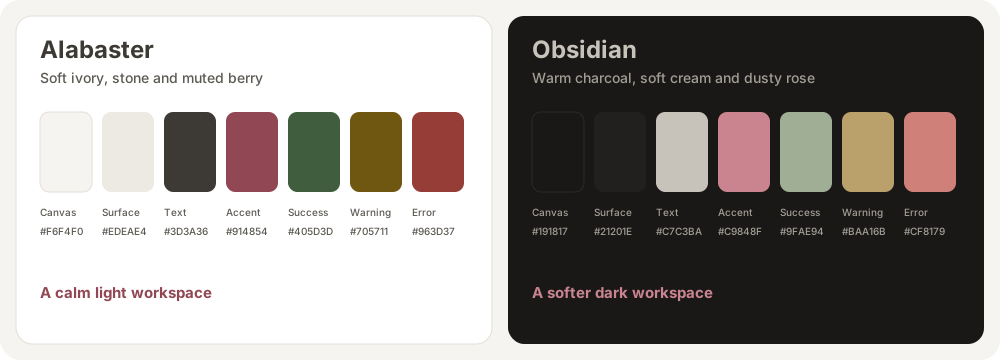
🌿 Serein Alabaster (Light Mode)
- The Atmosphere: Soft ivory surfaces inspired by high-grade Japanese book paper.
- Core Hex: Canvas
#F6F4F0, Surface#EDEAE4, Primary Text#3D3A36. - The Experience: Perfect for naturally lit rooms and morning sessions. It provides crisp contrast without the sterile blue-tinted glare of default white themes.
🌑 Serein Obsidian (Dark Mode)
- The Atmosphere: Deep, matte warm charcoal reminiscent of smoothed volcanic slate.
- Core Hex: Canvas
#191817, Surface#21201E, Primary Text#C7C3BA. - The Experience: Designed for late-night deep work. It consciously avoids pitch-black
#000000, eliminating the harsh edge halo (halation effect) that strains pupil dilation in dark rooms.
2. Palette Tokens & Accessibility Compliance
Every text-to-background pairing in Serein has been calibrated to pass WCAG 2.1 AA/AAA contrast guidelines (exceeding 4.5:1 for body copy and 7:1 for elevated text).
| Role | Alabaster (Light) | Obsidian (Dark) | Functional Purpose |
|---|---|---|---|
| Canvas | #F6F4F0 | #191817 | Main text canvas & terminal background |
| Surface | #EDEAE4 | #21201E | Sidebars, popup menus, float windows |
| Elevated | #E3DFD7 | #2B2926 | Active tabs, borders, status bars |
| Primary Text | #3D3A36 | #C7C3BA | Code identifiers, markdown body copy |
| Muted Text | #5C5852 | #A39E95 | Comments, line numbers, subtle metadata |
| Accent / Berry | #914854 | #C9848F | Active cursor, links, structural keywords |
| Semantic Error | #963D37 | #CF8179 | Diagnostics, deleted git lines |
| Semantic Warning | #705711 | #BAA16B | Compiler warnings, modified files |
| Semantic Success | #405D3D | #9FAE94 | Test passes, added git lines |
| Semantic Info | #435872 | #98A9BD | Informational callouts, secondary tags |
3. The 10-App Serein Ecosystem
Instead of a fragmented workspace where your editor is dark purple, your terminal is black, and your notes are bright white, Serein bridges your entire stack into a singular aesthetic experience:
Tier 1: Code Editors & Terminals
- Serein for VS Code: Native VSIX with workbench tokens, status bar harmony, and clean syntax trees.
- Serein for Neovim: 100% native Lua plugin with TreeSitter, LSP diagnostics, and
lualine.nvimintegrations. - Serein for Windows Terminal: Calibrated 16-ANSI color schemes for PowerShell, WSL Ubuntu, and Command Prompt.
- Serein for Sublime Text: High-speed
.sublime-packagepairing custom UI themes with syntax rules.
Tier 2: Knowledge & Thinking
- Serein for Obsidian: Markdown typography, custom callouts, and clean graph view for your Second Brain.
- Serein for Codex: Calibrated theme slot configs for AI prompt engineering canvases.
- Serein for Antigravity App: Warm palette tokens for agentic development workflows.
Tier 3: Operating System & Communication
- Serein for Windows: Native desktop themes packaged with 4K minimalist wallpapers.
- Serein for Telegram Desktop: Quiet chat bubbles and clean message panels.
- Serein for Vimium: Low-distraction link hints for keyboard-driven browsing in Chrome & Firefox.
4. In-Depth Setup Tutorials
To help you configure each tool with recommended fonts and settings, explore our dedicated setup guides:
- 📖 Guide 1: VS Code & Windows Terminal Complete Setup
- 📖 Guide 2: Neovim with Lazy.nvim, TreeSitter & Lualine
- 📖 Guide 3: Obsidian Second Brain & Distraction-Free Writing
5. Honest Design: What Serein Is (And What It Isn’t)
In an era of exaggerated claims, Serein takes an honest, science-grounded stance:
- Themes do not cure eye disease: Software colors are visual comfort preferences. Clinical evidence shows that display size, viewing distance, proper room illumination, and regular pauses (the 20-20-20 rule) are what truly safeguard eye health (American Academy of Ophthalmology).
- Restrained color usage reduces cognitive load: By reserving accent colors strictly for errors, warnings, and active keywords, your brain naturally stops parsing syntax noise and focuses entirely on the logic of your thoughts.
6. How to Get Started
All repositories are open source under the MIT License. Check out the official repository and star the tools you love:
👉 Explore the Central Hub on GitHub: cmduyeen/serein-theme
Created with dedication by Dyn (cmduyeen). Connect on GitHub or follow along on Dyn’s Notes.
Loading comments...